What happens after updating to Android Studio Panda
Android Studio Panda (version 4) ships with an updated set of bundled plugins, and one of those changes breaks Flutter development in a particularly disruptive way: the IDE stops recognising your Flutter project altogether. You can't run it, you can't debug it, it simply doesn't work.
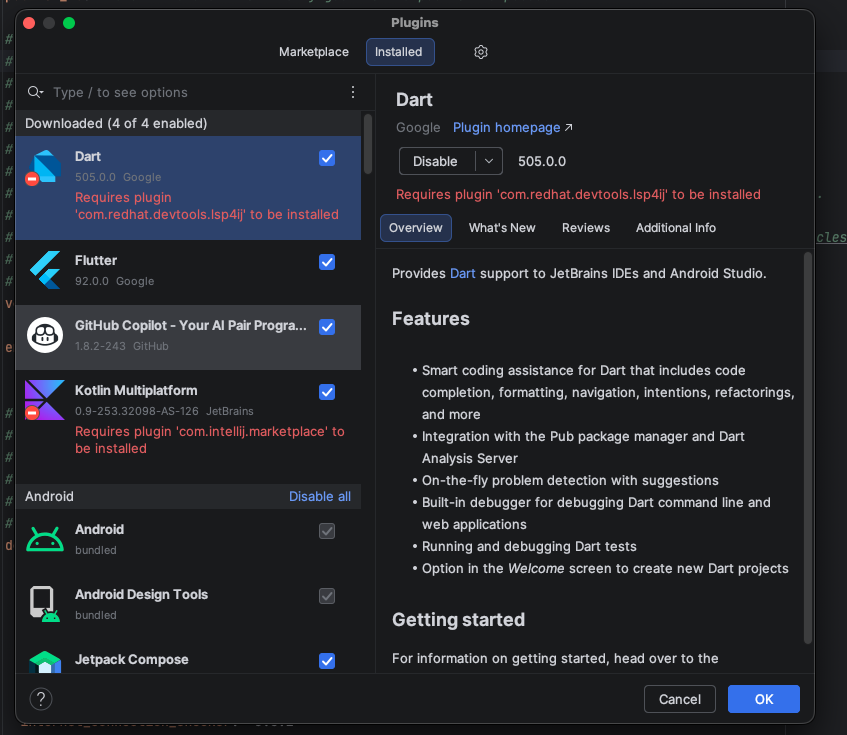
The root cause is that the Dart plugin (version 505.0.0) now requires the plugin com.redhat.devtools.lsp4j to be installed, but Android Studio Panda does not include it by default. Because Dart can't load, the Flutter plugin has nothing to build on, and the whole toolchain silently breaks.
The error: what you see in the plugins panel
If you open Settings → Plugins → Installed, you will see the Dart plugin flagged in red with the following message:
Requires plugin 'com.redhat.devtools.lsp4j' to be installedThis is why the project won't even load, it's not a compilation error or a Gradle issue, it's the Dart plugin itself that is disabled due to a missing dependency. Until lsp4j is present, nothing Flutter-related will work.
How to fix it
The fix is quick:
1. Open the Plugins panel. Go to Settings → Plugins and switch to the Marketplace tab.
2. Search for and install lsp4j. Look for Red Hat Commons or search directly for com.redhat.devtools.lsp4j. Install it and restart the IDE.
3. Alternatively, update Flutter and Dart plugins. Sometimes the plugin update that the Flutter team ships in response to this issue bundles the dependency or adjusts the requirement. Check the Installed tab for pending updates on both Flutter and Dart and apply them.
4. Invalidate caches and restart. After any plugin change, go to File → Invalidate Caches → Invalidate and Restart to make sure the IDE picks up the new state cleanly.
After restarting, the Dart plugin should load correctly, the red warning will be gone, and your Flutter project will be recognised and runnable again.
Why does this happen
From version 505.0.0 onwards, the Dart plugin delegates part of its language server integration to the lsp4j library, which is maintained by Red Hat as a separate plugin. In previous versions of Android Studio this dependency was either bundled or not required, so the upgrade catches many developers off guard.
The Flutter plugin depends entirely on Dart being active, so when Dart fails to load, Flutter silently disappears as well, no project detection, no device selector, nothing.
A note on updating Android Studio
Major Android Studio releases often introduce plugin dependency changes that the Flutter and Dart teams need a few days to catch up with. Before updating, it's worth checking the Flutter GitHub issues page to see if there are any known compatibility problems with the new IDE version. A few minutes of reading can save a lot of debugging time.
